


Clover: Perks and Order Ahead
4.17.97K Reviews
App Specs
- Version
- 6.1.5
- Updated On
- License
- Free
- Downloads
- 1,000,000+
- Developer
- Clover Network, Inc.
- Categories
- Lifestyle
- Platform
- Android, iOS
Screenshots
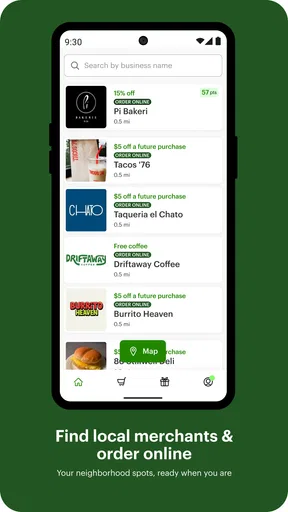
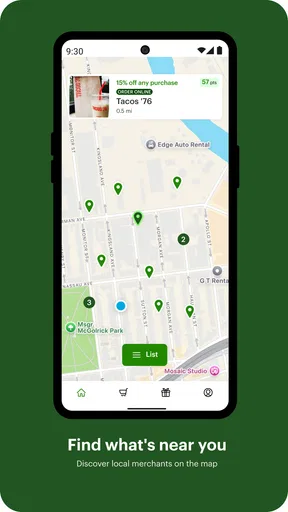
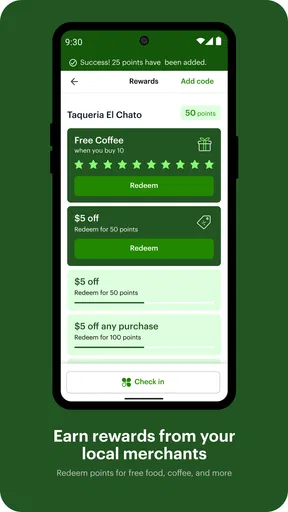
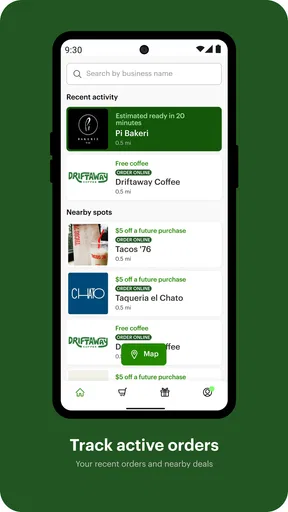
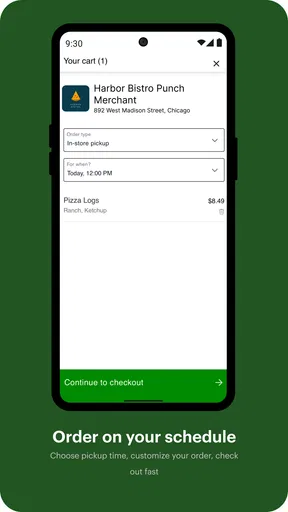
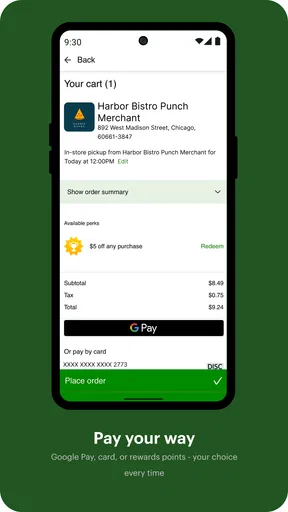
 Analysis by AppCompare
I approached Clover: Perks and Order Ahead as a practical companion for visits to participating local businesses, rather than as a general shopping app. Its purpose is straightforward: it can help you earn loyalty perks and place orders ahead of time at favorite local businesses. That makes it most useful when you already have places you visit regularly and want a simpler way to keep those interactions organized.
The app sits in the lifestyle category and is developed by Clover Network, Inc. It is free to install, carries a Mature 17+ content rating, and has reached over a million installs. Those details suggest a fairly established service, but they do not change the most important question: whether the businesses you actually use work with it. In my experience, that local connection matters more than the download itself.
What to expect before you start
The first thing I would tell a new user is not to expect a universal directory of every café, restaurant, shop, or neighborhood service. Clover is tied to businesses that use Clover’s ordering and loyalty tools. If your favorite place is not participating, the app cannot turn it into a supported location. That is the central trade-off, and understanding it early prevents disappointment.
When it works for a place you already visit, the value is easy to understand. Instead of relying on a paper punch card, trying to remember a business-specific rewards page, or waiting in a line just to place a routine order, you can use the app as part of that business’s existing customer experience. The strongest use case is repetition: the same coffee stop, lunch counter, bakery, or other local business that you return to often.
I would not install it expecting broad savings everywhere. The app is better viewed as a bridge between you and participating merchants. Its usefulness depends on the quality and availability of those local connections, so it feels more personal than a large marketplace app but also less universally useful.
The store listing shows an average rating of 4.1 from roughly 24,000 ratings, alongside about 8,000 written reviews. I read that as a sign of a generally positive but not flawless experience. Apps connected to local businesses naturally vary from one location to another, and that variation is important when deciding how much convenience you will get.
Who will get the most from it
I think Clover is a good fit for someone who has a small group of favorite local businesses and wants to check whether those places offer loyalty perks or advance ordering through one familiar app. It can also suit people who prefer planning a pickup before leaving home, especially when an order is routine and the business is already part of their weekly schedule.
Worth Reading Before You Choose

EA SPORTS FC Mobile 26 Is a Bigger Football Game, but It Takes Time

Flipboard Shows What News Apps Must Do Beyond the Feed

Switching to Android Auto Means Rethinking Your Driving Routine

Google Calendar Makes a Crowded Week Easier to Manage

Ludo King Makes the Most of the Minutes Between Plans

Baby Panda World Brings Quick Play to Modern Phones, but Its Game Library Feels Busy
It is less appealing if you rarely return to the same places, prefer comparing a large number of businesses in one marketplace, or want an app that works independently of merchant participation. In those situations, a broad delivery or restaurant-discovery service may be more useful. Those alternatives usually offer wider search coverage, while Clover’s advantage is the direct relationship with participating local businesses.
Installing it and getting oriented
Clover runs on Android devices using version 8.0 or later. After installing, I would begin by looking for the businesses you already know instead of browsing randomly. That simple approach gives you a meaningful test: if a familiar place appears and offers the kind of interaction you want, you can judge the app based on a real need rather than an abstract promise.
Take a moment to read the business page carefully. Look for the available loyalty or ordering route, then consider whether it matches how you normally buy. A place may be useful to you for perks but not for advance orders, or the reverse. Treat those as separate reasons to keep the app, rather than assuming every participating business offers the same experience.
Because Clover connects local businesses with their customers, the first setup is less about filling the app with personal preferences and more about finding the right merchant relationship. I recommend starting with one business, completing one small action, and only then deciding whether you want to explore further. That keeps the learning curve short and makes it easier to spot where a problem comes from.
How to reach your first useful result
The clearest first success is an order you genuinely intended to place anyway. Choose a familiar participating business, review the available ordering option, and use it for a simple purchase rather than an unusually complicated one. A routine order lets you concentrate on the flow: finding the business, selecting what you want, checking the details, and confirming that the request has gone through.
I would avoid making your first attempt during a rushed moment or with a large group order. If something looks different from the way you normally order in person, you want enough time to inspect it before confirming. This is one of the more useful habits with a merchant-connected app: use it first for a low-risk, familiar transaction, then expand once you understand that particular business’s process.
For loyalty perks, the same principle applies. Start with a place where you already expect to return. The benefit of a loyalty feature is cumulative, so a one-time visit is a poor test. If you visit a business regularly, the app has a chance to become a quiet record of that relationship instead of another digital tool you forget after one use.
A realistic example would be a weekday morning. I might check whether my usual local café appears, place the normal order before leaving, and use the visit as a chance to see whether the loyalty side is also relevant. If the café’s workflow is clear and the pickup is convenient, I have achieved something meaningful immediately. If the business does not appear or the available option does not match my routine, I have learned that the app is not essential for that stop.
Where first-time users can get confused
The biggest source of confusion is assuming that the app controls every part of a transaction in exactly the same way. A merchant-connected service often reflects the choices made by each individual business. The screen, available options, and practical usefulness can therefore differ from one location to another. I would not judge the entire app from a single awkward merchant page, but I also would not ignore repeated friction across the places you use.
Another easy mistake is treating loyalty perks as an instant discount system. The point is to support an ongoing relationship with a participating business, not necessarily to reduce every purchase immediately. Before relying on a perk, read the wording shown for that business and make sure the offer fits the purchase you are about to make. A few seconds of checking is better than assuming the benefit will apply automatically.
Ordering ahead can also create the wrong expectation about timing. Placing an order before arriving is convenient, but it does not mean every business handles preparation in the same way or that a busy period will feel identical to a quiet one. I see advance ordering as a way to start the process earlier, not as a guarantee that the entire visit will be instant.
There is also a practical distinction between discovering a business and managing a relationship with one. Clover is strongest after you have identified a place you like. If your main goal is to find new restaurants, compare menus across a large area, or arrange delivery from many unrelated merchants, a conventional marketplace app may provide a broader experience. Clover’s narrower focus is useful precisely because it can stay close to local businesses that you already care about.
Small habits that make the app more useful
My first tip is to use it as a test for repeat behavior, not as a one-time browsing exercise. Pick the local business you visit most often and see whether the app improves that exact routine. This reveals more than searching through dozens of unfamiliar listings, because you can compare the digital process with something you already understand.
My second tip is to separate convenience from rewards when evaluating it. You may find that advance ordering saves more effort than the perk system saves money, or that the loyalty side is valuable while ordering ahead is not. Thinking about those functions independently helps you avoid keeping the app for a feature you never use.
My third tip is to keep the first order deliberately simple. A standard item or familiar combination gives you a clean way to learn the merchant’s flow. Once that works, you can decide whether the app is suitable for less predictable orders. This is especially helpful when you are ordering for someone else, since small misunderstandings are easier to catch before you depend on the service for a time-sensitive visit.
A fourth useful habit is to check the selected business before completing an action. Local businesses can have similar names, and choosing the wrong location would undermine the convenience you were trying to gain. I would make that quick confirmation part of every order, particularly when traveling within an area with several nearby locations.
How it compares with familiar alternatives
Compared with paper loyalty cards, Clover is easier to keep in a phone and more naturally connected to a participating business’s ordering process. The trade-off is that a digital system can feel less immediate than a card you hand over at a counter, especially if you only visit a place occasionally. For regular customers, the convenience is more persuasive; for infrequent visitors, the difference may be minor.
Compared with large delivery and ordering marketplaces, Clover feels more local and less like a giant catalog. That can be an advantage when you already know where you want to buy. You are not necessarily looking for the widest range of merchants; you are trying to make a familiar stop smoother. On the other hand, marketplace apps are generally the better choice when discovery, broad selection, delivery comparisons, or a single search across many businesses is your priority.
Compared with a business’s own separate app or website, Clover can be convenient when several local businesses you use happen to support it. You may prefer one place to check rather than remembering a different digital system for every merchant. Still, a dedicated business app may offer a deeper experience for that one brand, so I would choose based on where you actually spend your time rather than assuming one platform must replace everything else.
Privacy, age rating, and everyday expectations
The Mature 17+ rating is worth noticing before installation, particularly for households where younger users share a device. An age label is not a promise about how every person will experience the app, but it is a useful reminder to check the store and account context before handing it to a child or teenager.
Since this is a lifestyle app linked to local purchasing, I would approach it with the same care I use for any service involved in orders and loyalty activity. Keep your account details accurate, review each transaction before confirming, and avoid treating the app as a substitute for checking the business’s own instructions. These habits are simple, but they matter more than installing every available feature.
The current version is 6.1.5, and the app has been available since September 26, 2011. Its long presence and broad install base make it feel less experimental than a brand-new local ordering tool, while the version number also reminds me that the experience can change over time. If a screen looks different after an update, I would recheck the selected business and order details rather than relying on memory.
When I would skip it
I would skip Clover if none of the businesses I regularly use appear to support the experience I want. Installing a loyalty and ordering app without a relevant local routine creates maintenance without much payoff. I would also look elsewhere if my main need were delivery discovery, extensive restaurant comparison, or a single service covering a very wide area.
I would be cautious about relying on it for an important, time-sensitive order until I had completed a normal transaction successfully. Advance ordering can be convenient, but any app that depends on local merchant workflows deserves a trial run. For an everyday purchase, a small experiment is sensible; for a special event or a large order, I would confirm the details directly with the business as well.
Finally, people who dislike maintaining separate loyalty relationships may find the app more distracting than helpful. Its value grows when it supports places you already enjoy. If you are trying to reduce the number of apps on your phone and do not have a clear participating business in mind, it may not earn a permanent place.
My next-step recommendation
I recommend starting with one favorite local business and one ordinary visit. Search for that place, inspect whether perks or ordering ahead fit your routine, and complete the smallest useful action. That path gives you a clear answer without requiring a large commitment or a tour of every part of the app.
After that first success, decide which side matters more to you. If the loyalty connection is useful, keep using it on repeat visits. If ordering ahead saves time, make it part of the occasions when you already know what you want. There is no need to force both functions into your routine if only one genuinely helps.
Overall, I see Clover as a focused lifestyle tool rather than an all-purpose shopping platform. Its best quality is the possibility of making familiar local purchases more organized, while its main limitation is the dependence on participating businesses and their individual workflows. If you already have favorite local places to return to, the app is worth a practical trial; if you need broad discovery and universal coverage, choose a wider alternative instead.
Pros
- Earn rewards and discounts at participating Clover merchants.
- Order ahead to save time during busy periods.
- Conveniently keeps eligible offers and loyalty perks in one place.
- Supports contactless ordering at participating businesses.
- Helps discover nearby restaurants and local merchants using Clover.
Cons
- Features depend heavily on whether local merchants support Clover.
- Rewards and offers may vary by location and expire quickly.
- Some orders may include service fees or minimum purchase limits.
- The app may request location access for nearby merchant features.
- Not all Clover-powered businesses offer ordering or loyalty rewards.
FAQs for Clover: Perks and Order Ahead
What is Clover: Perks and Order Ahead?
Clover: Perks and Order Ahead is a customer-focused app designed for participating Clover-powered businesses. It can help you discover nearby merchants, browse menus or product selections, place orders in advance, and manage rewards or loyalty perks in one place. The exact features available depend on the individual business, since each merchant controls its own ordering options, promotions, prices, and loyalty program.
Can I use the app at any restaurant or store?
No. The app is intended for businesses that support Clover’s customer services, so availability varies by location and merchant. Some businesses may offer order-ahead pickup, while others may only provide loyalty rewards, digital receipts, or basic business information. Before downloading, check whether your favorite restaurant, café, or store appears in the app and supports the feature you want to use.
How do rewards and perks work in Clover?
Rewards and perks are managed separately by participating businesses, which means the rules can differ from one merchant to another. A business may offer points, discounts, visit-based rewards, promotional offers, or other incentives. You generally need to create or use an account and identify yourself at checkout or when ordering. Always review the individual program’s terms, expiration dates, and redemption requirements.
Can I place an order ahead and customize it?
When a participating merchant enables order-ahead functionality, you can usually browse its available menu or catalog, select items, customize eligible options, and choose a pickup time or ordering method. However, not every business supports the same level of customization. Preparation times, item availability, taxes, service charges, cancellation policies, and pickup instructions are determined by the merchant and may change during busy periods.
Is Clover: Perks and Order Ahead free and safe to use?
Downloading the app is generally free, although purchases made through it are charged according to the selected business and order. You may need to provide account, contact, location, and payment-related information to use certain features. Review the app’s privacy policy and permissions before registering, and confirm order details carefully. Payment methods, refunds, cancellations, and support are typically subject to the participating merchant’s policies.


